

Hey, Prasad here 👋 I’m the voice behind the weekly newsletter “Big Tech Careers.”
This week I bring you a guest post from Sarvesh Talele, AI Engineer at TCS! He shares how he prepared and passed Claude Architect Certification in 5 days. Follow him on LinkedIn for more tips on working with Claude.
If you like the article, click the ❤️ icon. That helps me know you enjoy reading my content.
Couple of weeks ago, I shared my Preparation Roadmap for the Claude Certified Architect Certification. It kind of went viral. 🚀
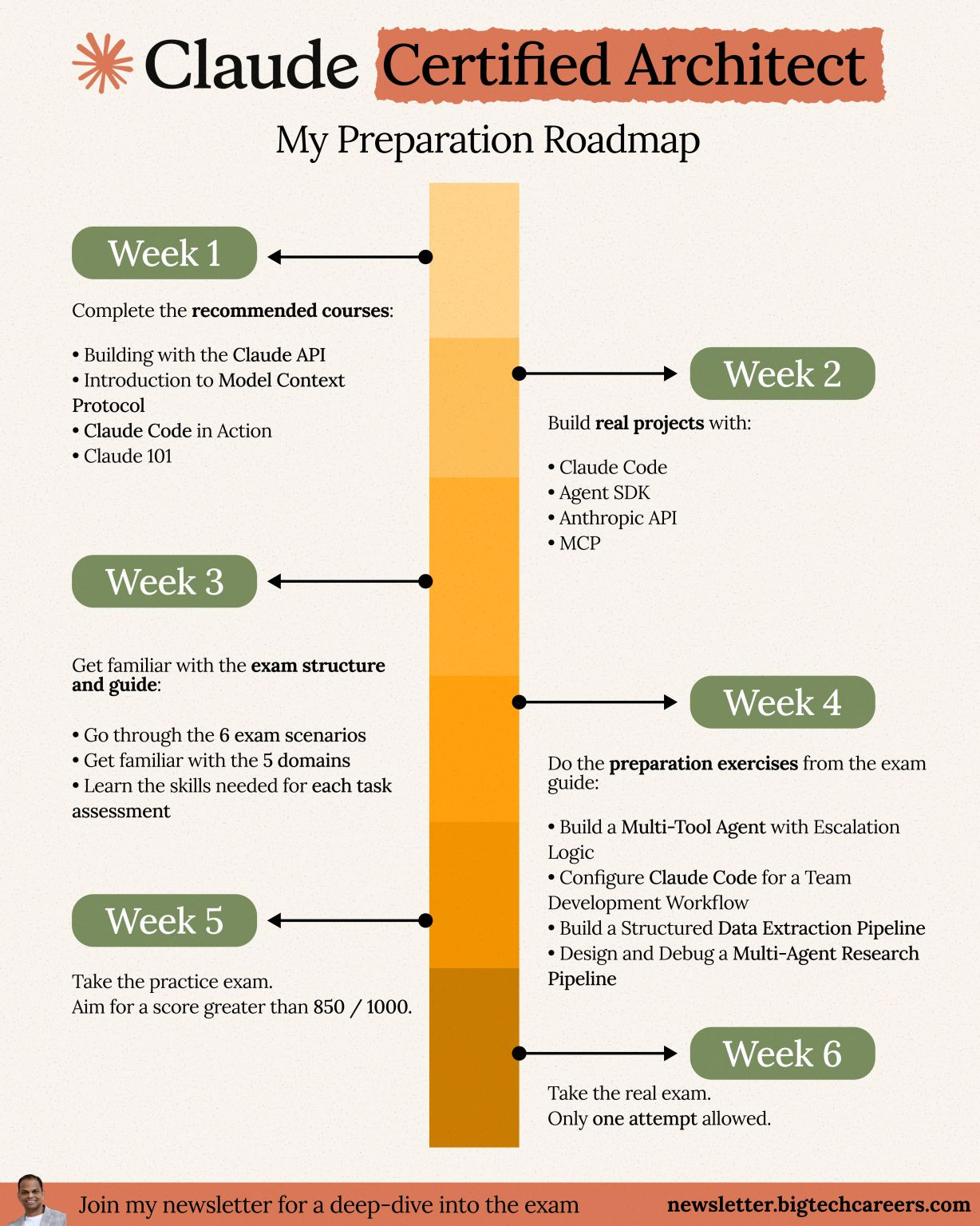
Two things happened:
A flood of comments and DMs thanking me for the roadmap
Early adopters sharing that they’d already passed the exam
That got me thinking — why just hear from me, when you can hear from someone who’s actually done it?
In this article, Sarvesh, who passed the Certification within a week of its launch, will break down:
The exact system they used to prepare
How prior Claude experience shaped their approach
A step-by-step framework you can follow
This is the kind of insider insight you won’t find in official docs.
A quick note before we dive in: Sarvesh cleared the exam in 5 days because he has hands-on experience with Claude and works with it on a daily basis. If you are someone starting fresh, take the framework below as a 5-week program rather than a 5-day one.
Your mileage may vary depending on your skill level — it may take 2 weeks for some and 10 weeks for others. Choose the pace you’re comfortable with and focus on gaining the knowledge and hands-on experience.
Now, over to you, Sarvesh!
A Bit About Where I’m Coming From
I spent 3.7 years building AI solutions at TCS. During this time, I worked across the full stack of practical AI engineering, including designing retrieval pipelines, building production grade multi agent systems, and delivering production integrations using Azure, LangChain, MCP, and Claude. Claude is now my primary tool for building, debugging, prototyping, and shaping architecture decisions in live client work.
When Anthropic announced the Claude Certified Architect Foundations certification on March 12, 2026, I approached it with extensive hands-on experience rather than as a beginner. I had already used Claude intensively and wanted to identify gaps in my understanding. That context matters because it directly influences how realistic a five day preparation timeline is for you.
I passed the exam, and this is the exact system I followed.
The Thing Most People Get Wrong Before They Even Start
When a new certification appears, most people begin with reading. They review the exam guide, study documentation, read blog posts, build detailed notes, and move through content with a steady sense of progress.
That approach alone won’t get you to a 720 score on this exam.
The Claude Certified Architect exam centers on one core skill: selecting the right architectural decision when three of the four options seem valid. The incorrect choices appear reasonable and often reflect what a strong engineer might choose in a slightly different context. The exam targets the gap between understanding a concept and applying it correctly under pressure when multiple answers feel defensible.
Reading alone does not bridge that gap. Practice does, especially when it includes immediate and precise feedback that shows exactly how and why an answer missed the mark.
This principle shaped the system I built.
Three Modes, One Tool, Five Days
Before I describe the system, here is the honest picture on time spent. Across the five days, I invested roughly 35 to 40 hours of focused preparation. That breaks down to roughly 8 hours on days one and two, 7 hours on day three, 9 hours on day four, and 6 hours on day five including the mock exam and targeted drilling.
If you are new to developing with Claude, plan for a longer duration based on your skillset and bandwidth. The approach outlined here works at any starting level though the timeline might vary.
I built three system prompts, each putting Claude into a different mode for a different stage of preparation. Setup instructions at the end of the article.
The first mode acts as a learning coach - Claude reads the exam guide before responding, explains each concept using three rules, pauses to confirm understanding, and links every concept to its domain and task. Commands control the flow.
The second mode acts as a practice coach - It creates new questions, applies a strict format where each incorrect option matches a distractor type, evaluates answers with clear reasoning steps, and tracks performance and weak areas.
The third mode acts as mock test - It selects four scenarios, assigns questions based on domain weight, shows one question at a time, and provides results only after you submit. The experience mirrors the real exam and builds test readiness.
The system runs within one Claude project. Upload the exam guide once, and all modes will use it across sessions. I'll first explain how I used it over 5 days to pass the exam, and then walk you through how you can set it up for your own preparation.
Day One and Two: Build the Foundation
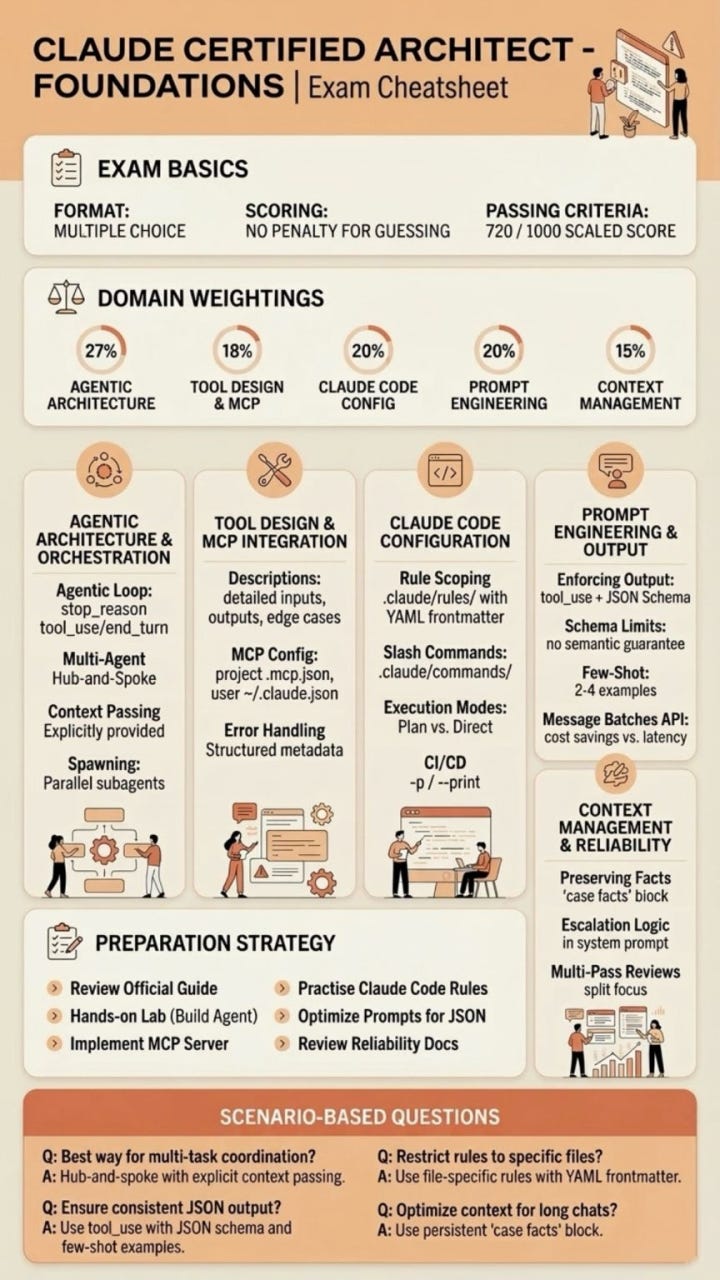
The exam guide defines five domains, with Domain 1 accounting for 27 percent of the score. It carries the highest weight and is often underestimated. The focus extends beyond using Claude to designing systems that operate reliably at scale.
I spent the first two days on the Anthropic Academy website. All courses are free and include a completion certificate.
I started with Claude 101 to organize my prior knowledge and identify misconceptions developed through daily practice.
Next, I completed AI Fluency: Framework and Foundations. This course introduces the 4D framework and builds the decision making model the exam evaluates. The focus shifts from defining concepts to selecting the right approach under constraints.
On day two, I worked through Building with the Claude API. The course covers authentication, multi turn interactions, system prompts, tool usage, context management, and architecture patterns. Domains 1, 4, and 5 rely heavily on this material.
Along with the courses, I utilized teaching mode and $learn commands. Each topic was promptly reinforced with organized explanations, annotated code examples, and decision analysis.
This integrated loop of organized learning and guided coaching shortened a two-week procedure to two concentrated days.
Day Three: MCP and Claude Code
Day three covered the two domains most people either skip or underestimate.
Domain 2 is an overview of Introduction to Model Context Protocol and Advanced Topics. The main takeaway is straightforward but important: tool selection is determined by how effectively the tools are described. When descriptions are unclear, Claude makes inexperienced choices, which show up in both production systems and on the exam.
These courses sharpen that edge. They demonstrate what strong tool descriptions look like and how accuracy directly improves dependability.
Domain 3 explains Claude Code in Action and Introduction to Agent Skills.
You move beyond basic usage to structure and control. CLAUDE.md hierarchies, path-specific rules, custom commands, scoped skills, and CI processes become part of your thinking, in addition to your tools. These patterns emerge instantly in exam scenarios, and any informal understanding clearly shows limitations.
By the end of day three, I had switched to teaching mode with $domain 2 and $domain 3. The coach divided each domain into task statements, key knowledge points, and essential skills, and then compared everything to real-world code examples from the guide.
That shift changed how I saw the exam. Questions stopped feeling random. Patterns became visible before they appeared.
Day Four: Practice Until the Patterns Become Automatic
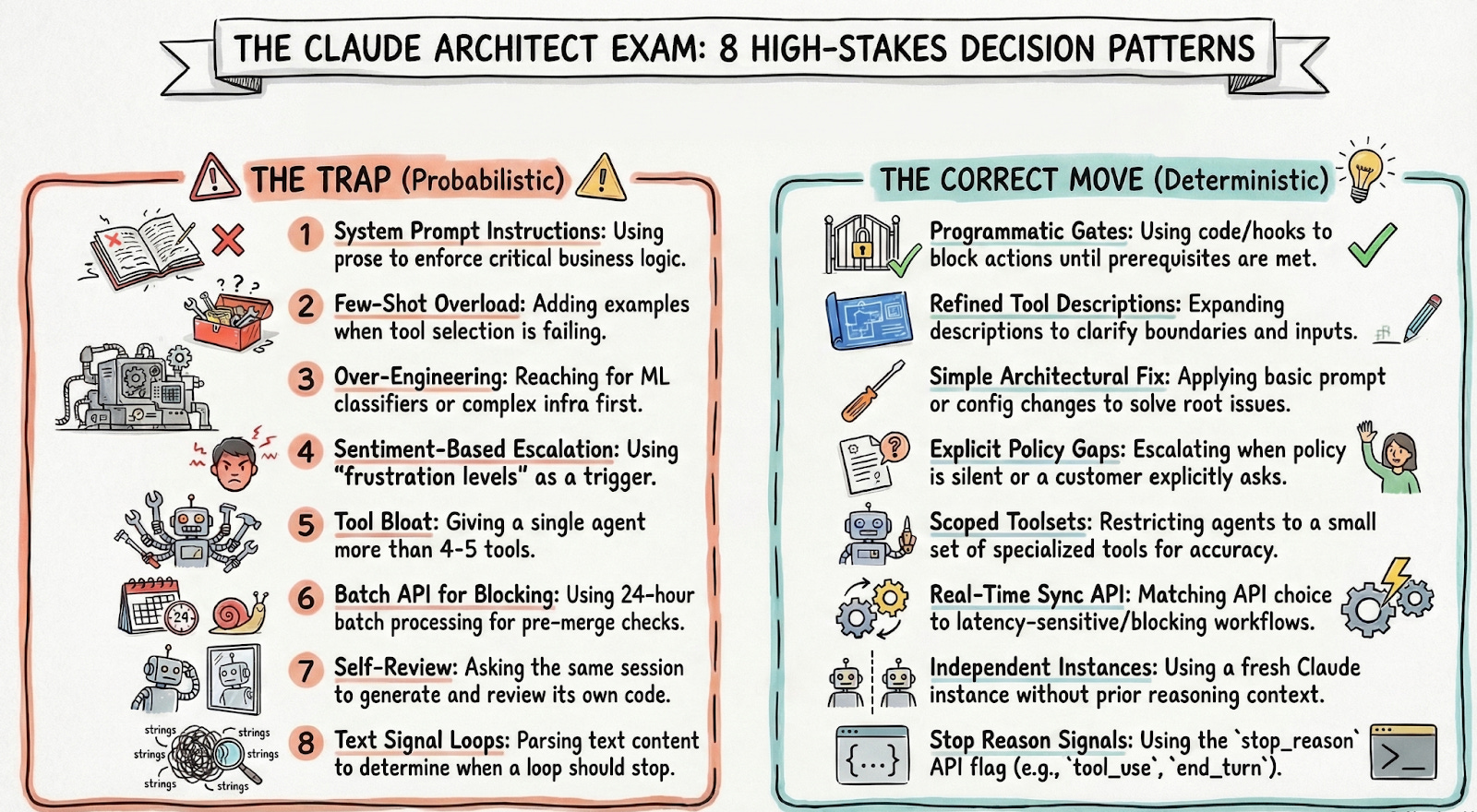
During the examination, a clear pattern is observed. The questions look different on the surface, yet they continually test the same fundamental errors in architectural judgment. I identified eight recurring distractor patterns which are discussed below:
The first is to depend on system prompt instructions to enforce important business logic in situations where a programmed gate is required.
The second is adding few-shot examples when the root cause is a tool description that is too minimal.
The third is over-engineering a solution, reaching for a classifier or ML system before the simpler architectural fix has been tried.
The fourth is escalating based on sentiment when the actual trigger should be explicit policy gaps or the customer’s own stated preference.
The fifth is giving an agent more than four or five tools, which degrades selection reliability. The sixth is using the Message Batches API for a blocking workflow that cannot tolerate a 24-hour processing window.
The seventh is self-review, asking the same session that generated the code to also review it, when an independent instance without prior reasoning context is what accuracy requires. The eighth is checking text content to determine whether the agentic loop should stop when `stop_reason` is the correct and only signal.
These patterns display what the test is truly looking for: exact architectural judgment when there is variability.
Day Five: The Mock Exam and What It Reveals
On day five, I used $mocktest standard in exam mode. Twenty-four questions. Four random situations. No suggestions, feedback, or advice until $submit.
The report that followed became the most valuable output from the entire process.
It displayed my estimated score, highlighted my strong and weak areas, and identified the distractor pattern I used the most frequently. Each question included the proper answer, the trap I chose, and a clear thinking process.
Domain 5, Context Management and Reliability, came out as my weakest point. The exam assesses the “lost in the middle” effect, in which models perform well at the beginning and finish of inputs but lose features in the middle of them. I understood the concept but lacked experience implementing it in real-world circumstances for context management. The simulated test revealed that gap.
I spent the afternoon drilling Domain 5 with $drill 5 and reinforcing it through $review context management until the pattern became instinctive.
The next morning, I scored 911 in the Claude Architect Exam.
Reflections After the Exam
The scenarios have more complexity than practice questions can express. Constraints are distributed throughout multiple phrases, with the most significant details frequently located in the middle. Reading too rapidly makes the correct answer feel incorrect. I slowed down after the first few questions when a pattern became crystal clear.
Production experience was quite beneficial. Tradeoff questions were familiar since they correlated scenarios I had already encountered. When deciding whether to batch or stream in a latency sensitive pipeline, I relied on real-world failures rather than theory. That type of foundation is tough to establish via reading and memorising alone.
The exam rewards meticulous thinking. I used almost all of the given time. Speed provides no benefit, but meticulous reasoning typically results in superior decisions. Overall, the exam seemed noteworthy. It rewards an in-depth understanding of how Claude acts at the system level, which extends beyond prompt engineering.
Setup Claude Project to prepare for exam:
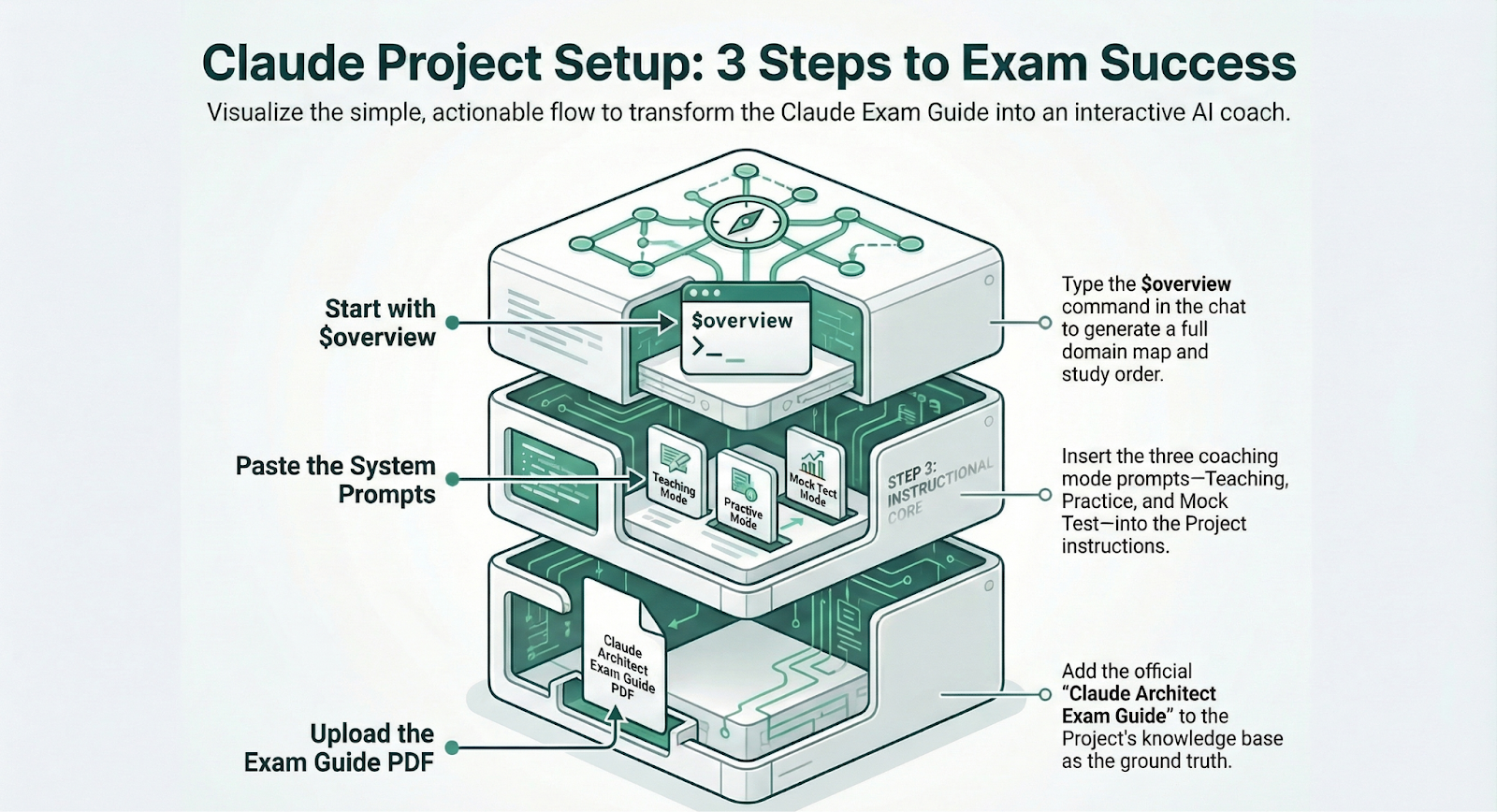
Overview:
The three coaching prompts are designed to live inside a single Claude Project. Here is how to set them up.
Step 1: Go to Claude.ai and create a new Project. Name it something like “CCA Exam Prep.”
Step 2: Upload the official exam guide PDF to the Project’s knowledge base. This is the document all three prompts reference when teaching concepts or generating questions. Once it is uploaded, you do not need to re-upload it across sessions.
Step 3: Paste each of the three system prompts into the Project instructions. The prompts are available here.
You switch between Learning Mode, Practice Mode, and Mock Test Mode by using the corresponding commands in the chat. All commands begin with $ to keep them distinct from normal questions.
Learning Mode
$overview—full domain map with weightings and study order
$domain [1–5]—every task statement in that domain with code anchors
$scenario [1–6]—step-by-step deep-dive with pauses for confirmation
$learn [topic] — single concept taught through the 3 master rules
$explain [concept]—senior engineer explanation with before/after code
$compare [A] vs [B] — side-by-side table with distractor class callout
Practice Mode:
$practice [1–6]—3 questions on a specific scenario, graded one at a time
$drill [1–5]—5 rapid-fire questions across a domain, score at the end
$hard [topic] — 1 question where all 3 wrong options are architecturally valid
$blind—2 questions with hidden scenario (true exam simulation)
$traps—1 question per distractor class, train recognition under pressure
$review [topic] — 2 questions targeting the most commonly missed concept
Mock Test Mode:
$mocktest short — 12 questions, ~15 min
$mocktest standard—24 questions, ~30 min
$mocktest full—48 questions, ~60 min
$submit—end the test and reveal the full diagnostic report
$review Q[n]—revisit any question after submission
$pause / $resume—save and continue
Check the detailed steps and in case you get stuck in the set up, feel free reach out to me over LinkedIn.
Prasad here again 👋
I would like to extend a big thank you to Sarvesh for sharing his insights with Big Tech Careers readers. Follow him on LinkedIn for more tips on working with Claude which he shares regularly.
Big Tech Interview Preparation Course
While I share everything for free here in this newsletter, if you need all the material in a structured course format with a deep dive into preparation methodology for behavioral interviews, I have a self-paced course for you.
Check the course page for more details.